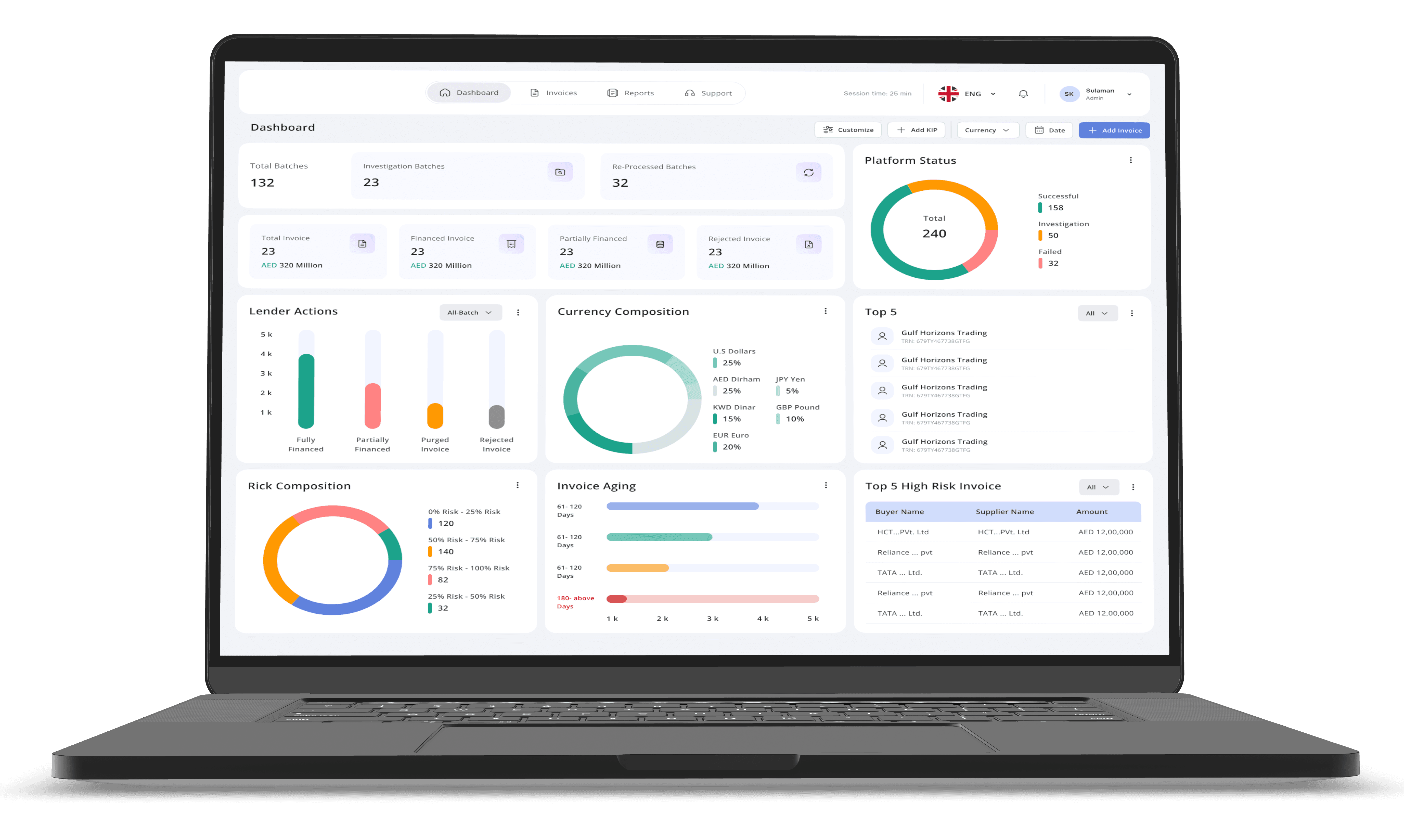
Invoice management Platform
Invoice management Platform
Smart Platform to manage all your
duplicate invoice
Smart Platform to manage all your
duplicate invoice
Invoice management platform transforms the way trade finance tackles its biggest hurdles, from detecting fraud to eliminating inefficiencies. Powered by cutting-edge blockchain and machine learning technologies, the platform offers real-time validation, seamless authenticity checks, and secure document management—ensuring a smarter, faster, and safer trading experience for businesses worldwide.
Invoice management platform transforms the way trade finance tackles its biggest hurdles, from detecting fraud to eliminating inefficiencies. Powered by cutting-edge blockchain and machine learning technologies, the platform offers real-time validation, seamless authenticity checks, and secure document management—ensuring a smarter, faster, and safer trading experience for businesses worldwide.
Timeline:
Timeline:
8 weeks, Client Project
8 weeks, Client Project
My Role:
My Role:
UI & UX Designer
UI & UX Designer
Deliverables:
Deliverables:
Improve info. Architecture, Brand Identity, User Stories, Enhanced User Flow, Wireframes, Visual Inhancement, Prototype, Design System
Improve info. Architecture, Brand Identity, User Stories, Enhanced User Flow, Wireframes, Visual Inhancement, Prototype, Design System
Impact of Re-Design
Impact of Re-Design
65 %
65 %
Enhanced the accuracy and efficiency of duplicate invoice detection
Enhanced the accuracy and efficiency of duplicate invoice detection
Design Process
Design Process
01
01
• Audit current portal - Identify pain points and usability issues.
• Audit current portal - Identify pain points and usability issues.
• User Behavior - Analyze date and feedback.
• User Behavior - Analyze date and feedback.
• Data Analysis - Summarize insights into trends and priorities.
• Data Analysis - Summarize insights into trends and priorities.
02
02
• Building Personas - Create detailed points and usability issues for the diverse needs of the user base.
• Building Personas - Create detailed points and usability issues for the diverse needs of the user base.
• Features - Aligne with user need and goals.
• Features - Aligne with user need and goals.
• Information Architecture - Organize content for easy access.
• Information Architecture - Organize content for easy access.
• User Flow - Map journeys to streamline navigation.
• User Flow - Map journeys to streamline navigation.
03
03
• Ideation - Brainstorm concepts; sketch and validate ideas.
• Ideation - Brainstorm concepts; sketch and validate ideas.
• UI Exploration - Experiment with visual style, layouts and interactions.
• UI Exploration - Experiment with visual style, layouts and interactions.
• Wireframe - Create low-fidelity and validate flows.
• Wireframe - Create low-fidelity and validate flows.
• Design System - Develop cohesive UI components and branding.
• Design System - Develop cohesive UI components and branding.
• Prototyping - Built and test interactive prototypes.
• Prototyping - Built and test interactive prototypes.
04
04
• Documentation - Create design handover documents, style guides, and component libraries.
• Documentation - Create design handover documents, style guides, and component libraries.
• Developer hand-off - Share annotated design and prototypes with developers.
• Developer hand-off - Share annotated design and prototypes with developers.
• Feedback loop - Address developer queries and ensure design ccuracy.
• Feedback loop - Address developer queries and ensure design ccuracy.
Client Consern
Client Consern
What’s stopping our banking users from making this portal part of their daily routine—and how can we make it indispensable to them?
What’s stopping our banking users from making this portal part of their daily routine—and how can we make it indispensable to them?
What would make fintech and banking aggregators feel excited, confident, and eager to onboard—and how can we deliver that experience effortlessly?
What would make fintech and banking aggregators feel excited, confident, and eager to onboard—and how can we deliver that experience effortlessly?
UX Audit Insights
UX Audit Insights
Design Feel Disconnected
Design Feel Disconnected
The interface lacks a consistent visual language—like each page is speaking a different dialect. This breaks the flow and makes the experience feel patchy.
The interface lacks a consistent visual language—like each page is speaking a different dialect. This breaks the flow and makes the experience feel patchy.
Navigation Feel Like a Maze
Navigation Feel Like a Maze
Finding your way around is harder than it should be. The current wayfinding tools don’t guide users clearly, leaving them guessing where to click next.
Finding your way around is harder than it should be. The current wayfinding tools don’t guide users clearly, leaving them guessing where to click next.
System Keeps Users in th Dark
System Keeps Users in th Dark
these's little to no feedback when something's loading or processing. Users are left wondering,
"Is it working? Did i Click the right"
these's little to no feedback when something's loading or processing. Users are left wondering,
"Is it working? Did i Click the right"
Too Much Memory Work
Too Much Memory Work
Users are expected to remember things instead of being gently reminded. It’s like asking someone to recall a password they created years ago—frustrating and unnecessary.
Users are expected to remember things instead of being gently reminded. It’s like asking someone to recall a password they created years ago—frustrating and unnecessary.
Not Friendly to First-Timers
Not Friendly to First-Timers
The portal assumes users already know how everything works. For newcomers, it’s like jumping into a movie halfway through—confusing and overwhelming.
The portal assumes users already know how everything works. For newcomers, it’s like jumping into a movie halfway through—confusing and overwhelming.
Users Feel Boxed In
Users Feel Boxed In
There’s little room for personalization or flexibility. Users can’t tweak things to suit their needs, which makes the experience feel rigid and impersonal.
There’s little room for personalization or flexibility. Users can’t tweak things to suit their needs, which makes the experience feel rigid and impersonal.
Design Pain Points
Design Pain Points
Cluttered User Interface
Cluttered User Interface
The current interface presents an overwhelming amount of information, making navigation and task execution difficult for users.
The current interface presents an overwhelming amount of information, making navigation and task execution difficult for users.
Unclear Workflows and Information Architechure
Unclear Workflows and Information Architechure
Users struggle to understand the flow of actions and how information is organized, leading to inefficiencies and errors.
Users struggle to understand the flow of actions and how information is organized, leading to inefficiencies and errors.
Manual Identification of Duplicate Invoice
Manual Identification of Duplicate Invoice
The Process of deleting duplicate invoices is entirely manual, resulting in increased workload and potrntial for oversight.
The Process of deleting duplicate invoices is entirely manual, resulting in increased workload and potrntial for oversight.
Problem Statement
Problem Statement
Banking employees are encountering critical usability and functional challenges within the current invoice management system, specifically in the identification and resolution of duplicate invoices. The prevailing issues — characterized by confusing navigational paths, inconsistent terminology, inadequate automated detection, and poorly presented data with restricted search— collectively impede efficient workflow, introduce preventable errors, and erode employee productivity, demanding a redesign that prioritizes clarity, automation, and user-centric data access.
Banking employees are encountering critical usability and functional challenges within the current invoice management system, specifically in the identification and resolution of duplicate invoices. The prevailing issues — characterized by confusing navigational paths, inconsistent terminology, inadequate automated detection, and poorly presented data with restricted search— collectively impede efficient workflow, introduce preventable errors, and erode employee productivity, demanding a redesign that prioritizes clarity, automation, and user-centric data access.
Project Objective
Project Objective
• Elevate User Experience & Navigation
• Elevate User Experience & Navigation
• Optimize Data Interaction
• Optimize Data Interaction
• Streamline Core Workflow
• Streamline Core Workflow
• Implement Advanced Search & Filtering
• Implement Advanced Search & Filtering
• Ensure Scalability & Adaptability
• Ensure Scalability & Adaptability
Strategic Goals
Strategic Goals
• Boost operational Efficiency
• Boost operational Efficiency
• Improve Data Accuracy
• Improve Data Accuracy
• Increase Employee Productivity
• Increase Employee Productivity
• Suggort Business Growth
• Suggort Business Growth
• Drive Innovation
• Drive Innovation
User Persona
User Persona
Sarah
Ahmad
Sarah
Ahmad
Senior Banking Operations Specialist
Senior Banking Operations Specialist
Age: 34 years | Experiance: Mid-Management | Technical Proficiency: High (Familiar with various banking software and digital platform)
Age: 34 years | Experiance: Mid-Management | Technical Proficiency: High (Familiar with various banking software and digital platform)
With over a decade of banking experience, Sarah is a detail-oriented trade finance specialist skilled in invoice financing, compliance, and risk mitigation.
With over a decade of banking experience, Sarah is a detail-oriented trade finance specialist skilled in invoice financing, compliance, and risk mitigation.
Pain Points
Pain Points
• High-Volume Processing: Efficently managing thousands of invoice daily under strict regulatory demands.
• High-Volume Processing: Efficently managing thousands of invoice daily under strict regulatory demands.
• Duplicate invoice Resolution: Inefficient identification and resolution of duplicat invoice lead to financial discrepancies.
• Duplicate invoice Resolution: Inefficient identification and resolution of duplicat invoice lead to financial discrepancies.
• Complax Tracking: Difficulty managing invoice accross multiple client and intricate financial structure.
• Complax Tracking: Difficulty managing invoice accross multiple client and intricate financial structure.

Key Objective
Key Objective
• Ensure Data Integrity & Accuracy.
• Ensure Data Integrity & Accuracy.
• Maintain clear and organized audit trail.
• Maintain clear and organized audit trail.
• Mitigate financial risk and prevent fraud.
• Mitigate financial risk and prevent fraud.
• Enhance overall operational efficiency.
• Enhance overall operational efficiency.
Core Motivation
Core Motivation
"Need a reliable, efficient, and accurate tools to manage high-stakes financial operations withour compromising security or compliances."
"Need a reliable, efficient, and accurate tools to manage high-stakes financial operations withour compromising security or compliances."
Improvised Information Architecture
Improvised Information Architecture
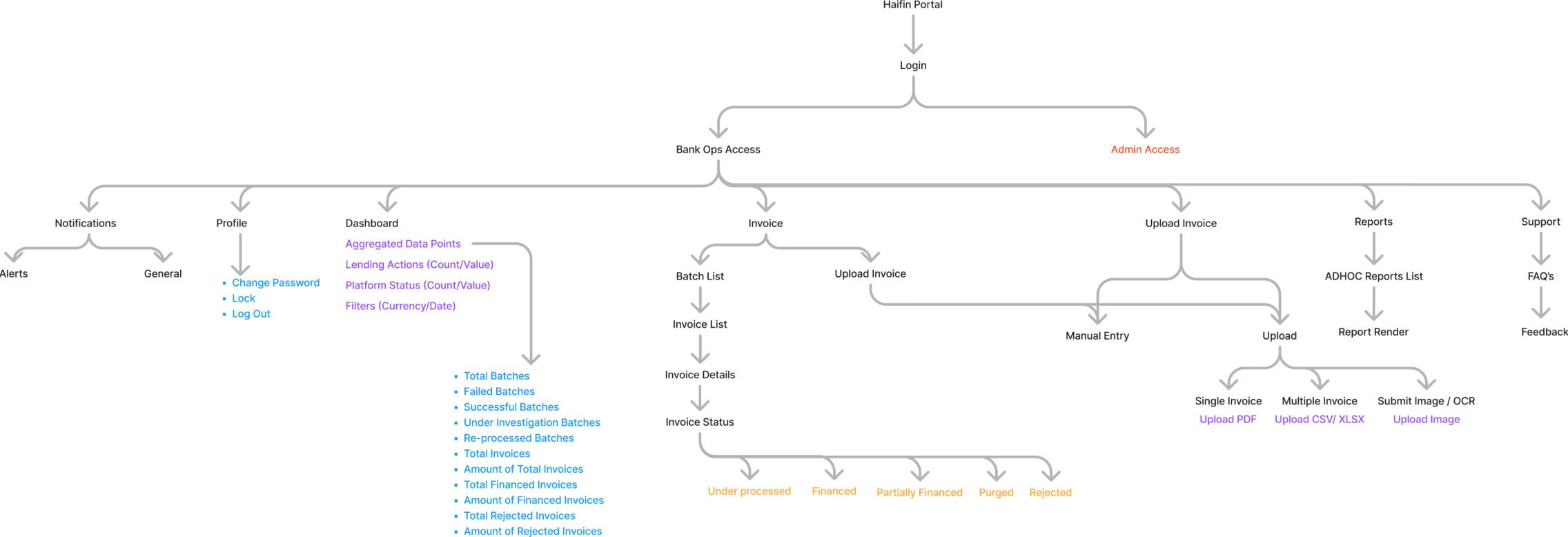
Improvements
Improvements
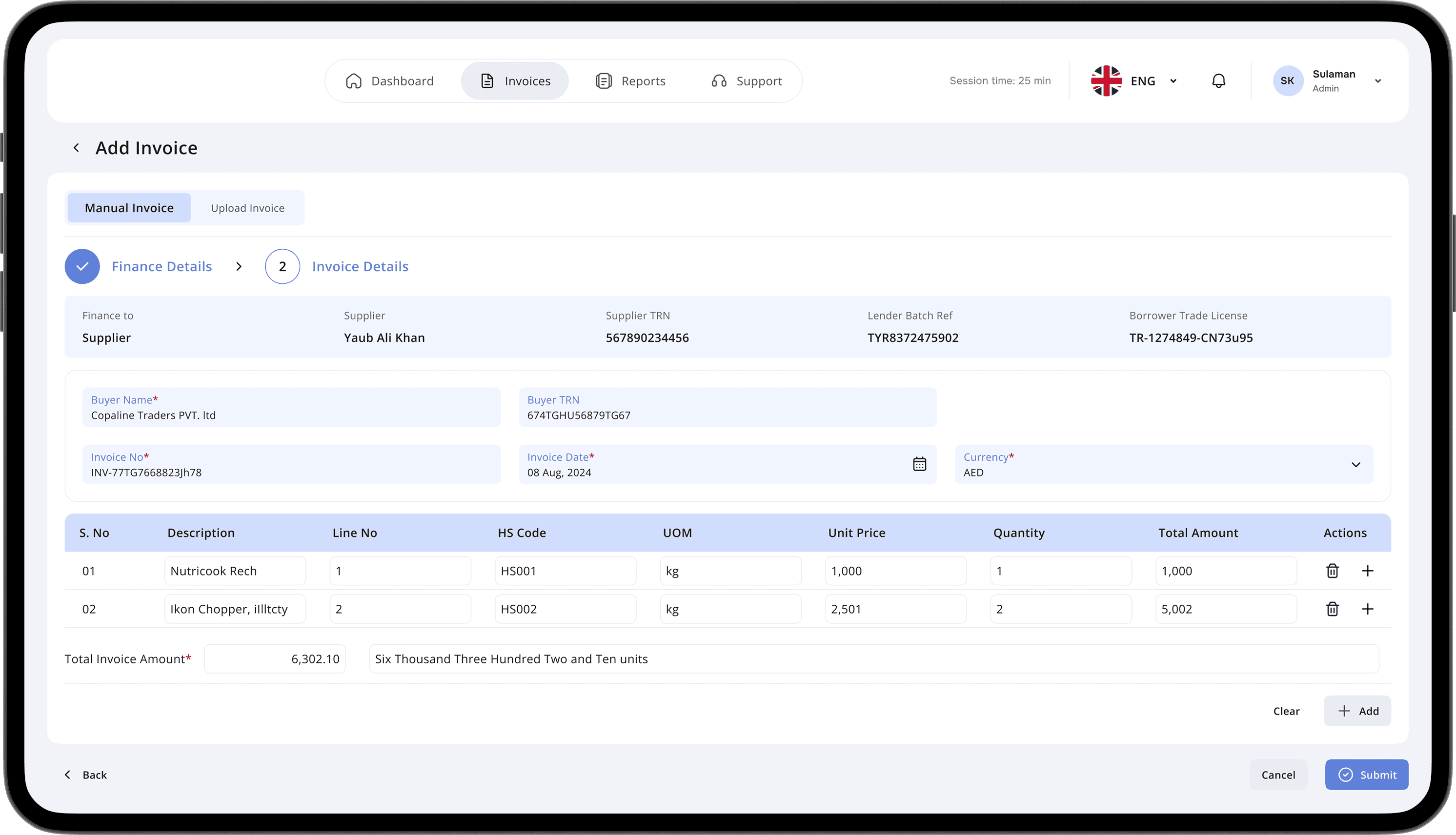
Streamlined Invoice Submission
Streamlined Invoice Submission
Elevated the invoice uploading experience by creating a clear, intuitive, and highly user-friendly workflow, minimizing processing time and errors.
Elevated the invoice uploading experience by creating a clear, intuitive, and highly user-friendly workflow, minimizing processing time and errors.
Unified & Efficient Navigaton
Unified & Efficient Navigaton
Established a cohesive and logical navigation system throughout the portal, significantly enhancing user efficiency and content access.
Established a cohesive and logical navigation system throughout the portal, significantly enhancing user efficiency and content access.
Empowered User Support
Empowered User Support
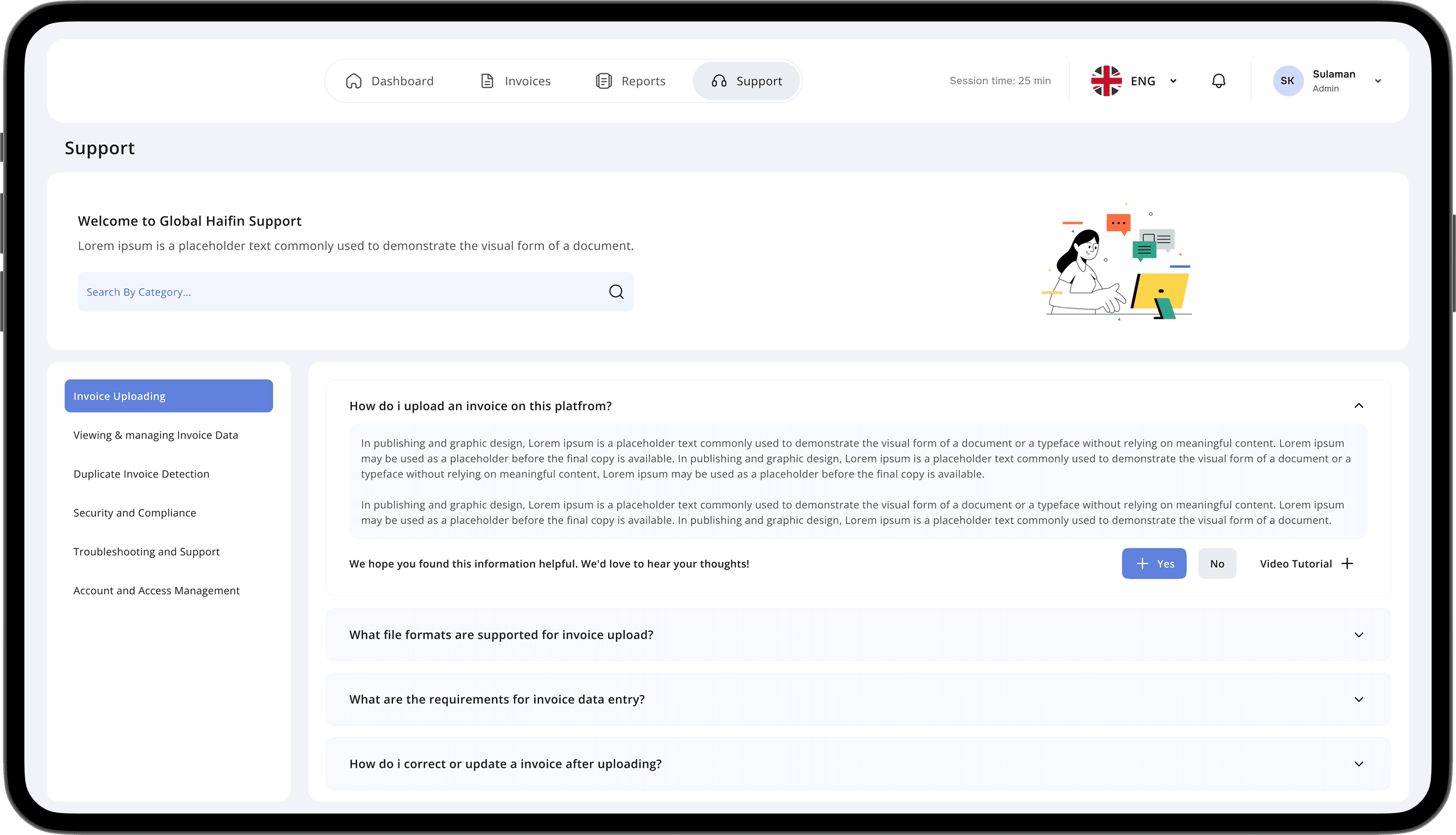
Introduced a Support and Documentation section that helps users find answers and troubleshoot issues on their own, reducing the need for direct assistance.
Introduced a Support and Documentation section that helps users find answers and troubleshoot issues on their own, reducing the need for direct assistance.
Improvised User Flows
Improvised User Flows
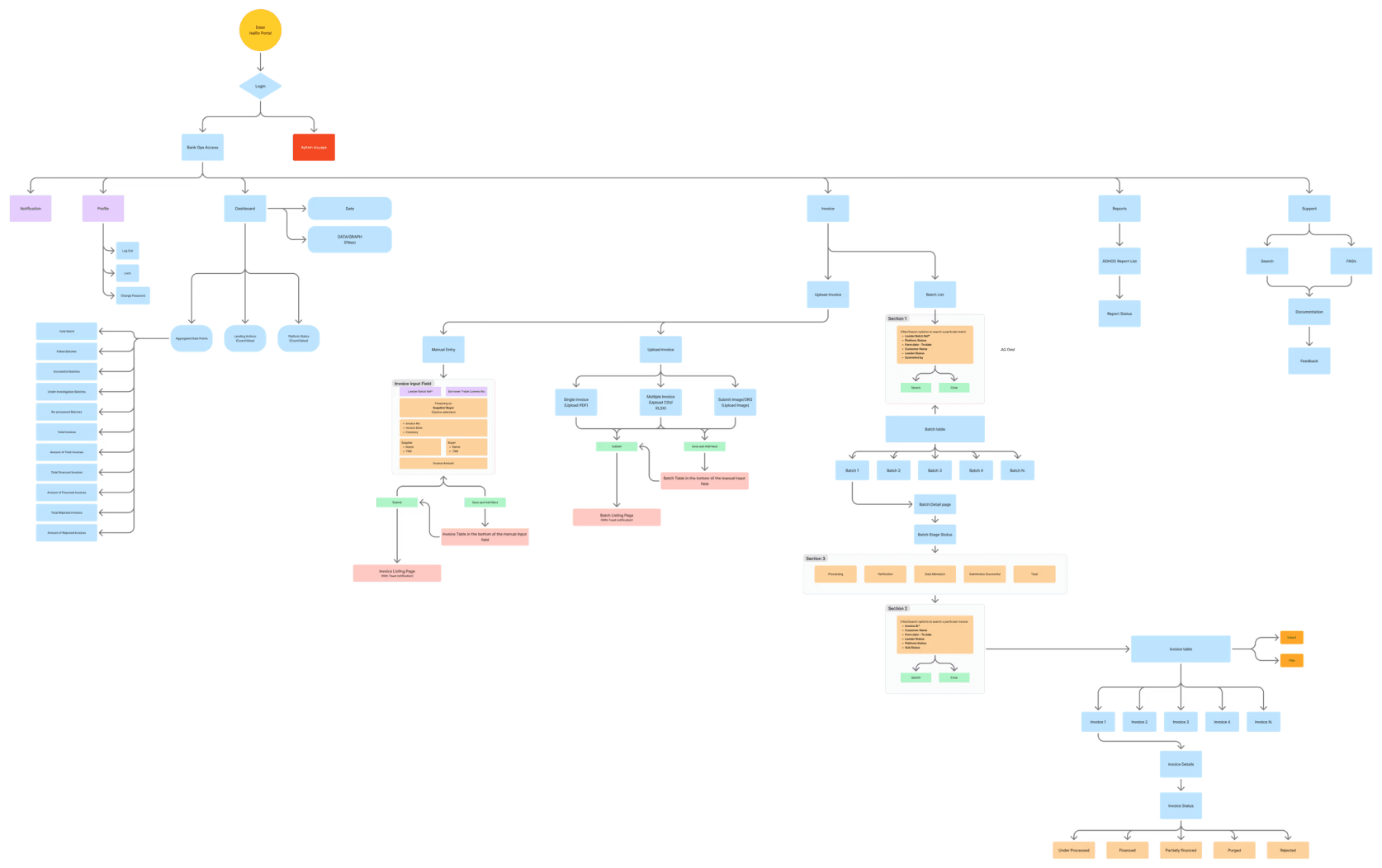
Improvements
Improvements
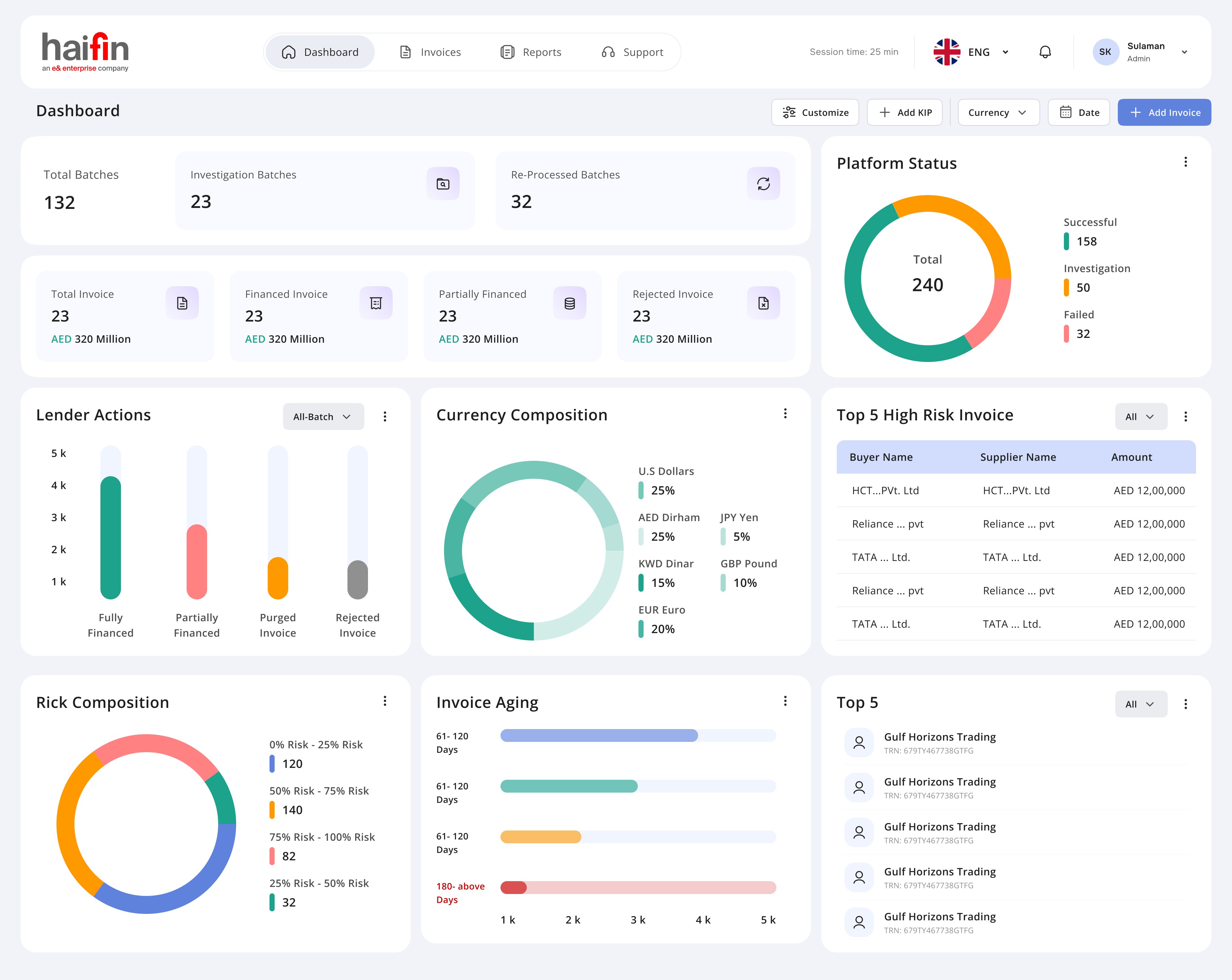
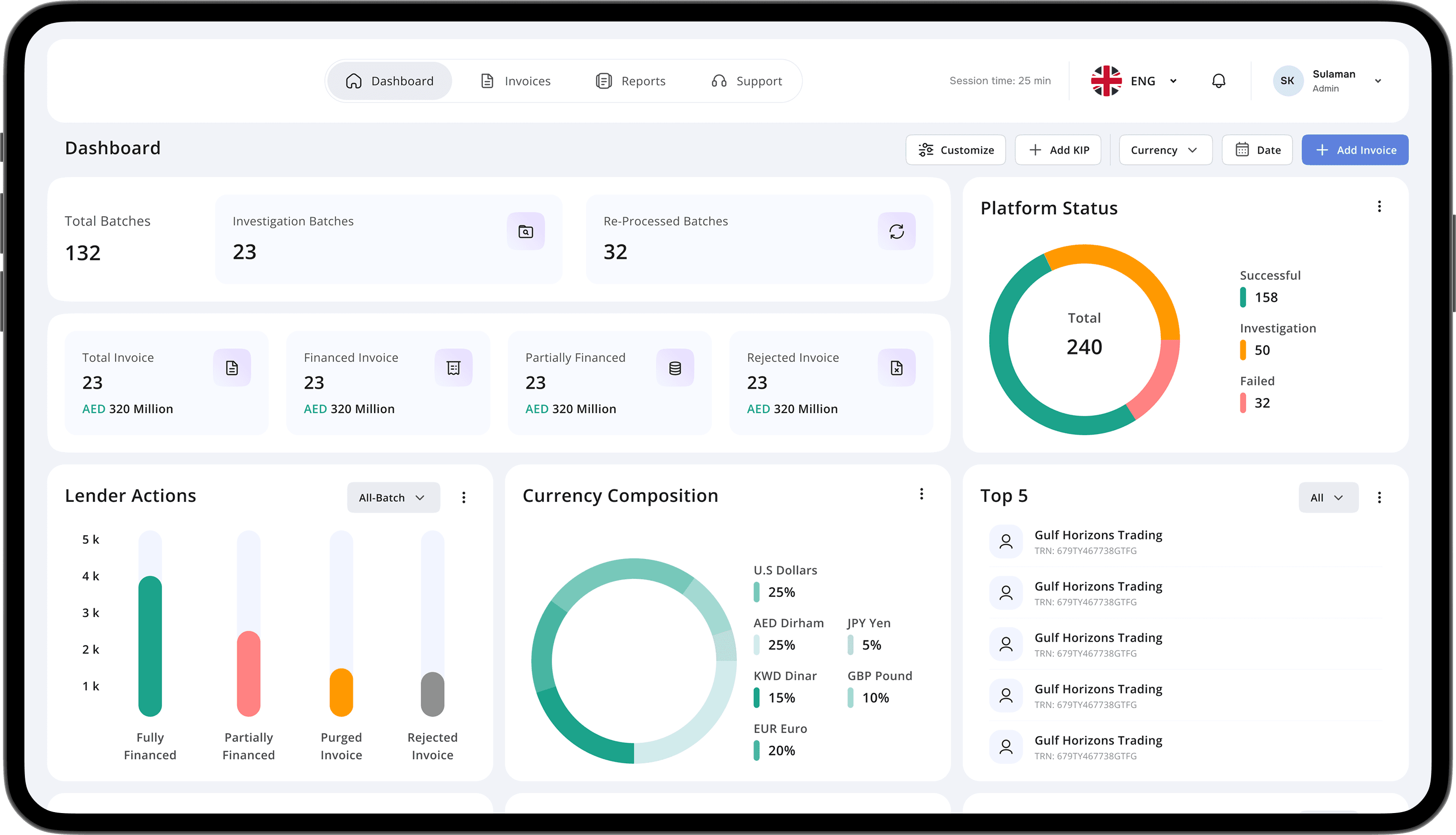
Elevated Dashboard Usability
Elevated Dashboard Usability
Re-engineered the hierarchy and interaction models for dashboard data points, ensuring a more intuitive and efficient user experience.
Re-engineered the hierarchy and interaction models for dashboard data points, ensuring a more intuitive and efficient user experience.
Enhanced Report Accessibility
Enhanced Report Accessibility
Redesigned the report navigation flow to provide seamless access and improve overall user engagement with analytical tools.
Redesigned the report navigation flow to provide seamless access and improve overall user engagement with analytical tools.
Enhanced Portal
Enhanced Portal
Optimize Data Grid
Functionality
Optimize Data Grid
Functionality
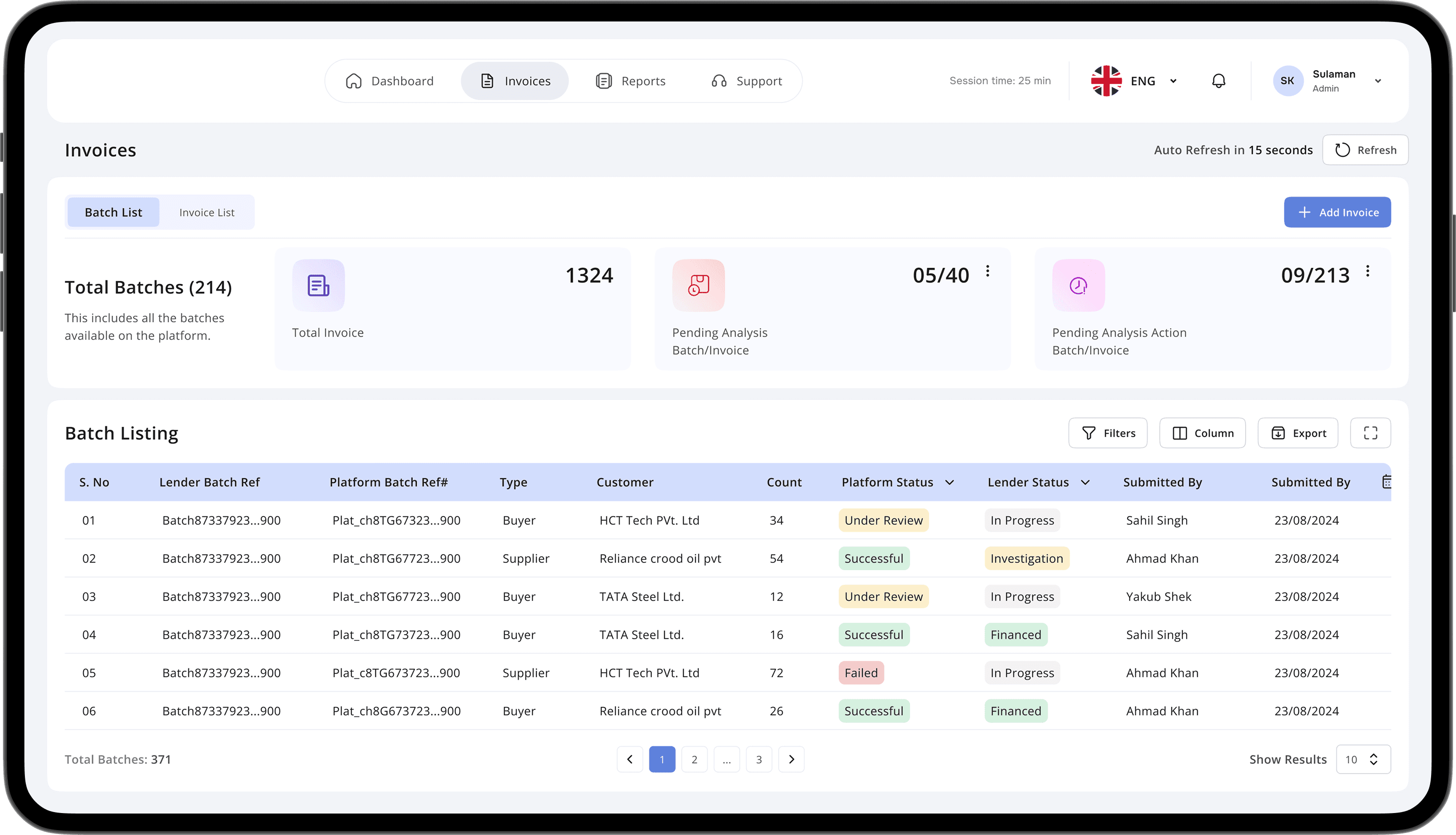
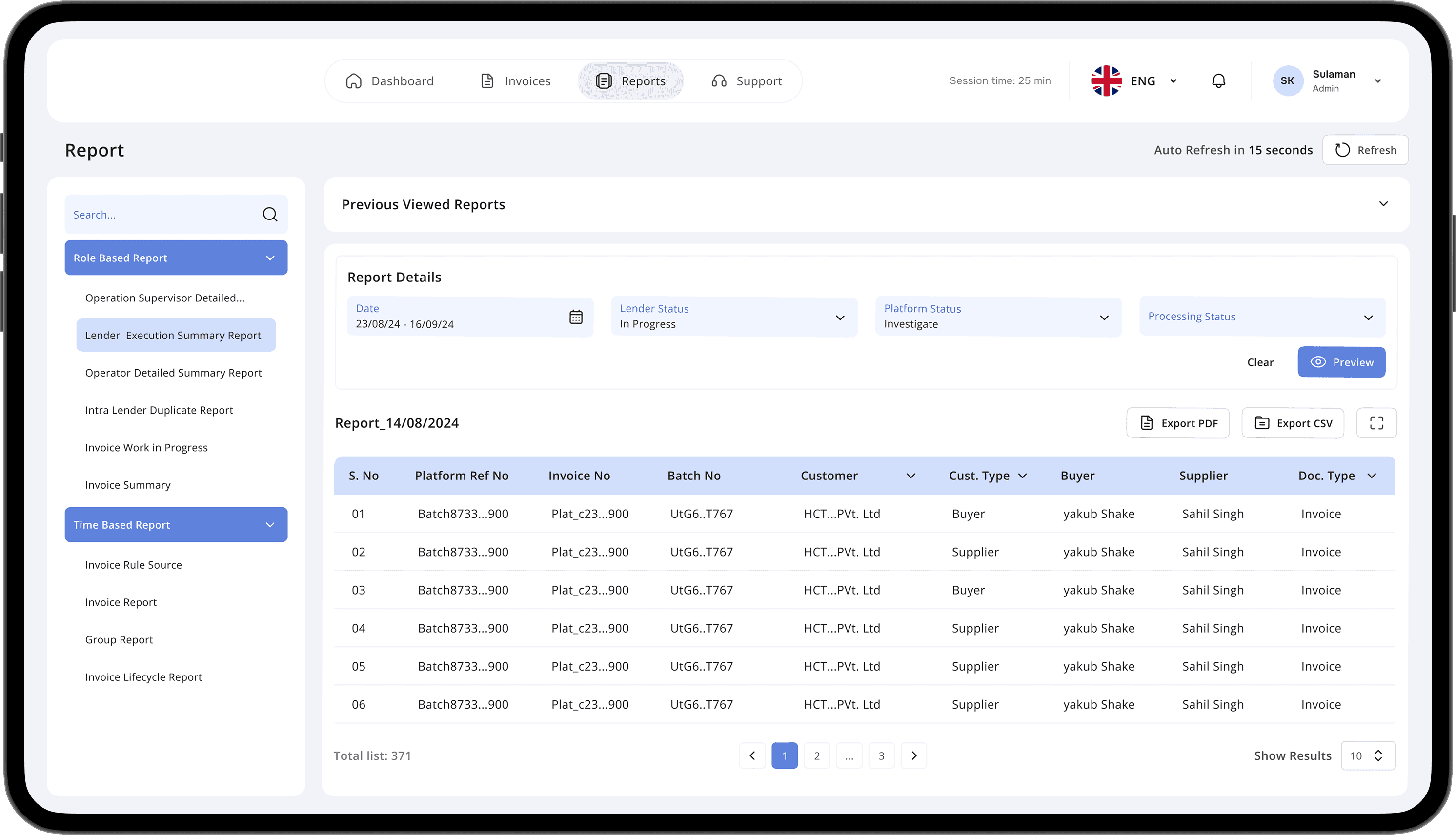
Feature: Introduced robust table interaction capabilities, such as configurable global and column-level filtering, alongside intuitive column rearrangement. These features enable user to taitor data views precisely to theie individual analytical needs
Feature: Introduced robust table interaction capabilities, such as configurable global and column-level filtering, alongside intuitive column rearrangement. These features enable user to taitor data views precisely to theie individual analytical needs
Impact: By granting users profound control over data presentation, this enhancement drastically reduces information overload, minimizes search times, and directly contributes to a substantial uplift in data-driven decision-making and operational efficiency.
Impact: By granting users profound control over data presentation, this enhancement drastically reduces information overload, minimizes search times, and directly contributes to a substantial uplift in data-driven decision-making and operational efficiency.
Proactive User Engagement &
Feedback
Proactive User Engagement &
Feedback
Feature: Introduced a readily available, one-click feedback button designed for the swift submission of user issue suggestions or insights from any point in the workflow.
Feature: Introduced a readily available, one-click feedback button designed for the swift submission of user issue suggestions or insights from any point in the workflow.
Impact: By democratizing feedback submission, this functionality cultivates a highly responsive product environment. This significantly improves our ability to proactively address user needs, validate design assumptions, and drive targeted enhancements, thereby strengthening user loyalty and accelerating product refinement cycles.
Impact: By democratizing feedback submission, this functionality cultivates a highly responsive product environment. This significantly improves our ability to proactively address user needs, validate design assumptions, and drive targeted enhancements, thereby strengthening user loyalty and accelerating product refinement cycles.
Intentional Visual
Prioritization
Intentional Visual
Prioritization
Approach: Developed a robust visual hierarchy system utilizing distinct color contrasts, dynamic font sizing for primary content, and purposeful image integration to direct user attention to key information intuitively. Strategic application of whitespace ensures visual clarity and prevents information overload.
Approach: Developed a robust visual hierarchy system utilizing distinct color contrasts, dynamic font sizing for primary content, and purposeful image integration to direct user attention to key information intuitively. Strategic application of whitespace ensures visual clarity and prevents information overload.
Impact: By guiding user focus effectively, this design ensures a highly efficient information processing pathway. This leads to an improved user experience characterized by faster task completion, deeper content engagement, and a reduction in user frustration typically associated with cluttered or disorganized interfaces.
Impact: By guiding user focus effectively, this design ensures a highly efficient information processing pathway. This leads to an improved user experience characterized by faster task completion, deeper content engagement, and a reduction in user frustration typically associated with cluttered or disorganized interfaces.
Proactive Duplicate Invoice
Prevention
Proactive Duplicate Invoice
Prevention
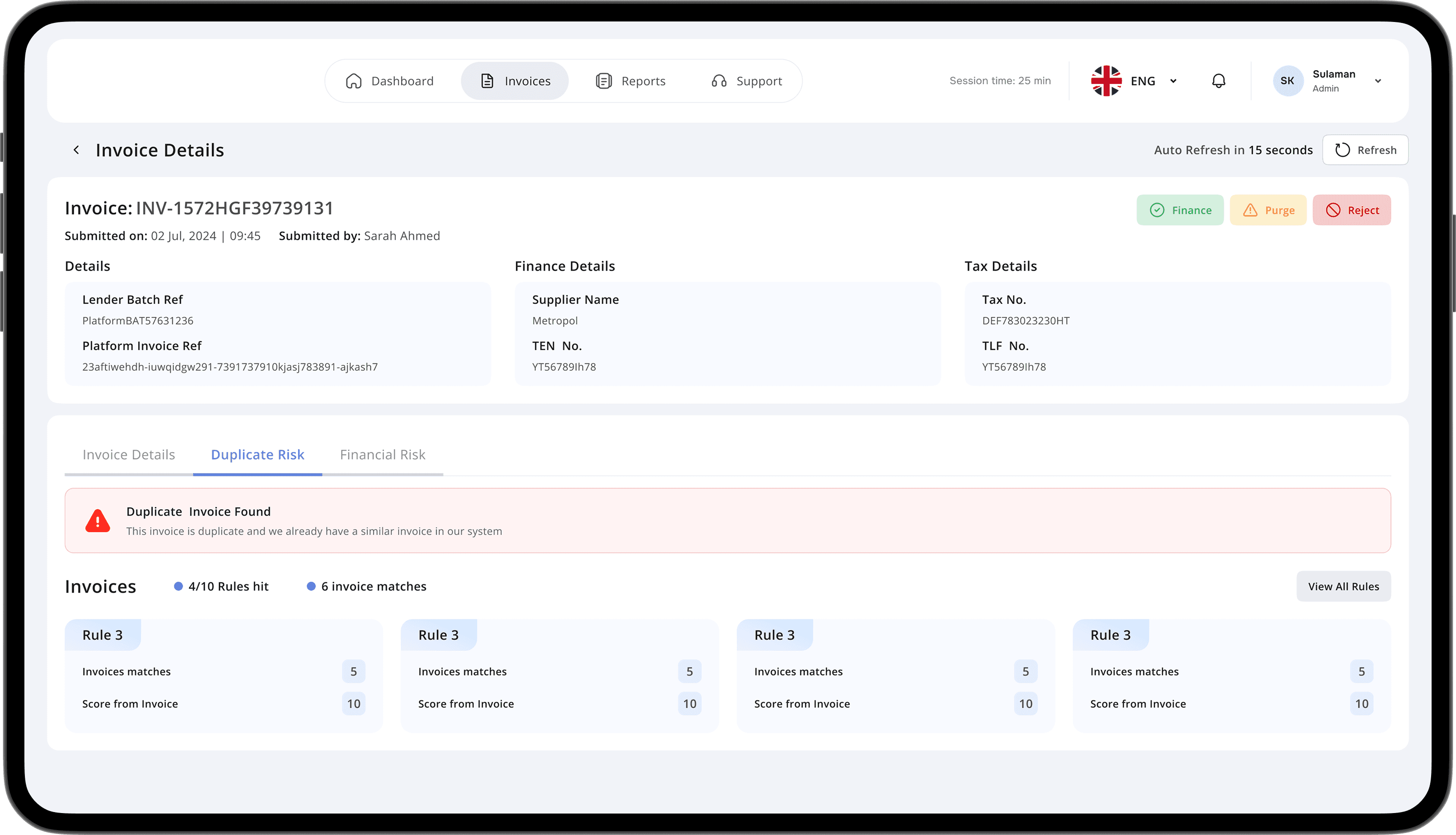
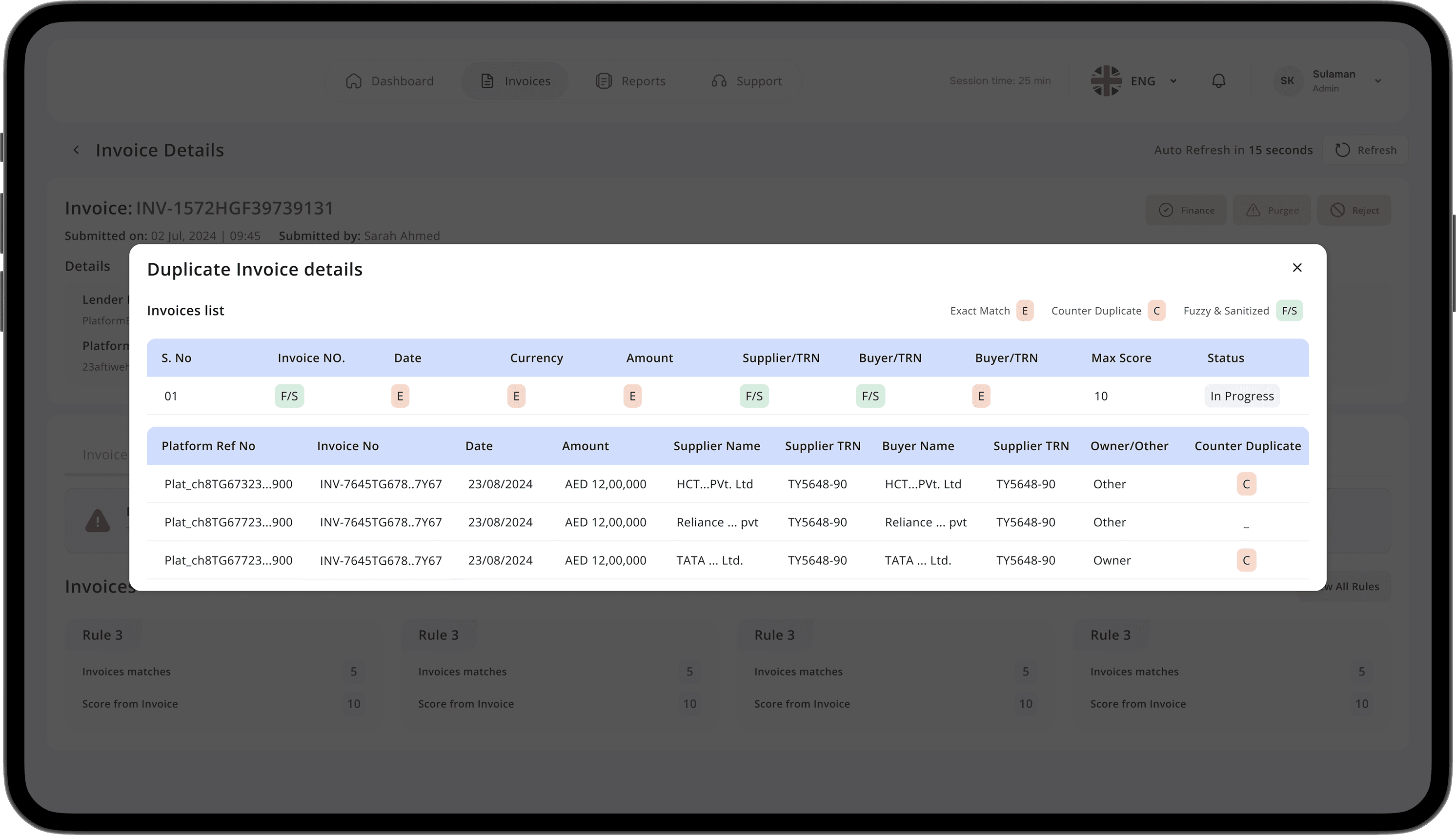
Feature: Developed an intelligent automation module to continuously scan and flag potential duplicate invoices. The system operates on a robust set of predefined criteria (e.g., invoice number, vendor ID, monetary value) and provides real-time alerts for user validation.
Feature: Developed an intelligent automation module to continuously scan and flag potential duplicate invoices. The system operates on a robust set of predefined criteria (e.g., invoice number, vendor ID, monetary value) and provides real-time alerts for user validation.
Impact: This core functionality elevates the reliability of the invoice management process, freeing employees from tedious manual verification and allowing them to focus on higher-value tasks. By systematically preventing costly duplicate payments and ensuring data consistency, it directly strengthens financial controls and significantly reduces operational risk.
Impact: This core functionality elevates the reliability of the invoice management process, freeing employees from tedious manual verification and allowing them to focus on higher-value tasks. By systematically preventing costly duplicate payments and ensuring data consistency, it directly strengthens financial controls and significantly reduces operational risk.
Enhanced Information Grouping &
Navigation
Enhanced Information Grouping &
Navigation
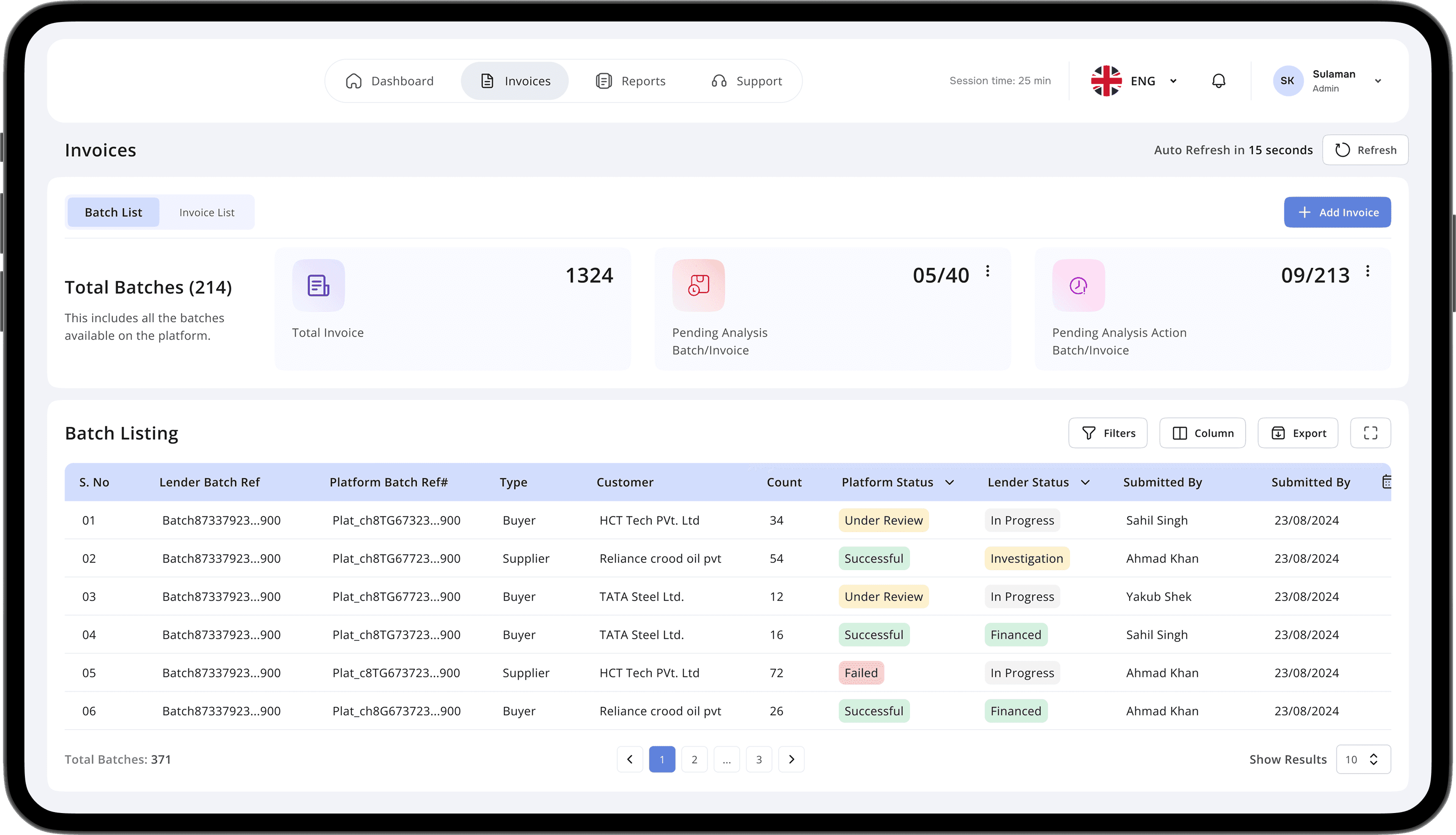
Approach: Developed a refined information architecture by thoughtfully consolidating related content and functionalities into intuitive, overarching categories.
Approach: Developed a refined information architecture by thoughtfully consolidating related content and functionalities into intuitive, overarching categories.
Impact: This strategic organization significantly streamlines the user journey, allowing for rapid access to required information. It minimizes user friction by presenting a coherent structure, leading to improved task completion rates and a more fluid user experience.
Impact: This strategic organization significantly streamlines the user journey, allowing for rapid access to required information. It minimizes user friction by presenting a coherent structure, leading to improved task completion rates and a more fluid user experience.
Seemless Data
Persistence
Seemless Data
Persistence
Feature: Introduced an intelligent auto-save capability that systematically preserves all inputted data without manual intervention. This safeguards ongoing work against unforeseen disruptions, including network outages or technical glitches, ensuring no information is inadvertently lost.
Feature: Introduced an intelligent auto-save capability that systematically preserves all inputted data without manual intervention. This safeguards ongoing work against unforeseen disruptions, including network outages or technical glitches, ensuring no information is inadvertently lost.
Impact: This core functionality guarantees an uninterrupted and highly reliable user experience. By proactively protecting data, it empowers employees to maintain focus on their tasks, eliminates the productivity drain associated with data re-entry, and reinforces the system's dependability for critical business operations.
Impact: This core functionality guarantees an uninterrupted and highly reliable user experience. By proactively protecting data, it empowers employees to maintain focus on their tasks, eliminates the productivity drain associated with data re-entry, and reinforces the system's dependability for critical business operations.
Dyanamic & Configurable
Dashboards
Dyanamic & Configurable
Dashboards
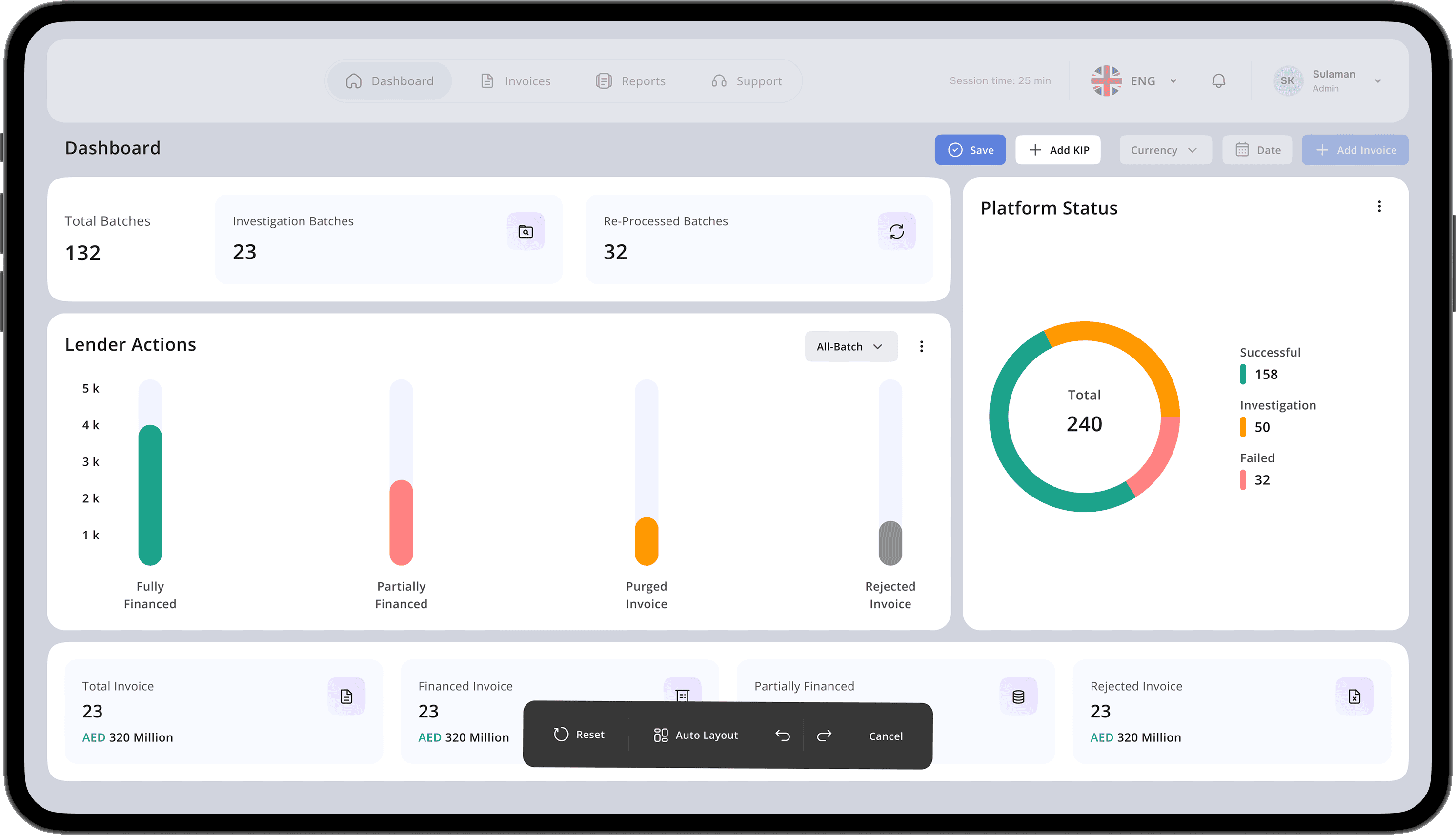
Approach: Developed a dynamic dashboard framework that grants users comprehensive control over their data insights. This includes the ability to select from a library of widgets, freely arrange their display, and apply granular data filters to construct a workspace optimized for their specific requirements.
Approach: Developed a dynamic dashboard framework that grants users comprehensive control over their data insights. This includes the ability to select from a library of widgets, freely arrange their display, and apply granular data filters to construct a workspace optimized for their specific requirements.
Impact: By enabling deep customization, this feature empowers users to create highly efficient, tailored views of their operational data. It directly leads to accelerated information assimilation, a more streamlined task flow, and a measurable increase in user engagement and satisfaction, ultimately driving better informed and faster business actions.
Impact: By enabling deep customization, this feature empowers users to create highly efficient, tailored views of their operational data. It directly leads to accelerated information assimilation, a more streamlined task flow, and a measurable increase in user engagement and satisfaction, ultimately driving better informed and faster business actions.
Optimized Workflow
Efficiency
Optimized Workflow
Efficiency
Feature: Simplified critical task flows by meticulously removing unnecessary stages and establishing a coherent, sequential user journey. Visual cues and embedded contextual guides were strategically integrated to support users through each step, ensuring seamless execution.
Feature: Simplified critical task flows by meticulously removing unnecessary stages and establishing a coherent, sequential user journey. Visual cues and embedded contextual guides were strategically integrated to support users through each step, ensuring seamless execution.
Impact: By enhancing the directness and clarity of task pathways, this improvement empowers users to accomplish objectives with greater speed and accuracy. This translates to substantial gains in system proficiency, reduced reliance on external support, and a measurable uplift in overall user satisfaction and operational throughput.
Impact: By enhancing the directness and clarity of task pathways, this improvement empowers users to accomplish objectives with greater speed and accuracy. This translates to substantial gains in system proficiency, reduced reliance on external support, and a measurable uplift in overall user satisfaction and operational throughput.
Optimized First-Time User
Experiance (FTUE)
Optimized First-Time User
Experiance (FTUE)
Approach: Implemented a concise and intuitive onboarding tutorial designed to seamlessly guide new users through the portal's core functionalities. This initial experience strategically familiarizes them with key features and navigational paradigms.
Approach: Implemented a concise and intuitive onboarding tutorial designed to seamlessly guide new users through the portal's core functionalities. This initial experience strategically familiarizes them with key features and navigational paradigms.
Impact: This structured onboarding significantly enhances user adoption and proficiency from the outset. By pre-empting potential confusion and building foundational understanding, it empowers users to navigate the platform with confidence, accelerating time-to-value and fostering long-term engagement.
Impact: This structured onboarding significantly enhances user adoption and proficiency from the outset. By pre-empting potential confusion and building foundational understanding, it empowers users to navigate the platform with confidence, accelerating time-to-value and fostering long-term engagement.

Personal Reflections and Learning
Personal Reflections and Learning
The Imperative for Modern Banking: Building Trust, Maximizing Workflow Efficiency, and Securing Future UX Through User-Centric Design.
The Imperative for Modern Banking: Building Trust, Maximizing Workflow Efficiency, and Securing Future UX Through User-Centric Design.
Bringing Together Business Goals and What Users Want
Bringing Together Business Goals and What Users Want
Balancing business goals with user expectations was challenging. Through extensive research, I identified how UX could enhance engagement and retain users while meeting compliance and operational needs. The design solutions focused on simplifying usability and attracting customers.
Balancing business goals with user expectations was challenging. Through extensive research, I identified how UX could enhance engagement and retain users while meeting compliance and operational needs. The design solutions focused on simplifying usability and attracting customers.
Making Workflows Work Better and Faster
Making Workflows Work Better and Faster
Money matters can get pretty complicated, but making things easier with better UX really boosts how happy users are. By cutting down on mental strain, simplifying those long verification steps, and adding clear feedback, I made sure that banking was smooth and hassle-free for everyone.
Money matters can get pretty complicated, but making things easier with better UX really boosts how happy users are. By cutting down on mental strain, simplifying those long verification steps, and adding clear feedback, I made sure that banking was smooth and hassle-free for everyone.